
 Jean-Pierre MartineauandClaude Opus 5
37955639c6
Jean-Pierre MartineauandClaude Opus 5
37955639c6
The first public release. The version goes to 0.9.0 and the changelog carries one
entry, which the release job lifts verbatim as the release notes.

[Unreleased] had refilled since the last fold with one change -- --mock keeping its
invented mesh out of your real history. On a first release there is no previous
behaviour for it to have changed from, so it is folded into the entry's existing --mock
sentence, in that entry's voice, and [Unreleased] is empty again.

Reading the notes as a newcomer would, three claims were not true, and each was checked
against the running app rather than argued:

- `meshterm map` is not a command. It was the first example a stranger would type, and
  it answers "No such command". The map is a picture, so it lives in the menu; the
  example is `meshterm info` now.
- The Time Machine does not wind the map back. It is braille charts of recorded history
  over a day, a week, a month or all of it -- no map in it at all.
- Only the PicoCalc gets the handheld layout. It is chosen solely by the device tree
  reading "Luckfox Lyra"; the uConsole has no detection and runs the desktop layout on
  its 1280x720 screen, which has the room for it.

The manual's three sample outputs move from 0.3.7 to 0.9.0 with it, so the version a
reader sees in docs/cli.md matches the one they downloaded.

Co-Authored-By: Claude Opus 5 (1M context) <noreply@anthropic.com>
MeshTerm
A full-screen terminal companion for MeshCore LoRa mesh devices — tune your radio, chat across the mesh, watch the network live, and keep a longitudinal record of everything you overhear, all from a connected serial, Bluetooth, or network (TCP) companion.
MeshTerm is interactive by default: a modern, keyboard-driven TUI built on
Rich and
prompt_toolkit. It is also
fully scriptable — every screen has a mirror meshterm subcommand — so the same
capabilities drive both an evening of exploring the mesh and a cron job. Every packet the
radio overhears is recorded to a local SQLite database, so the longer you run it, the more
your mesh's history is worth.







MeshTerm is a side project, not a product. Bug reports are very welcome — but please open an issue before writing a pull request. More on how it's run.
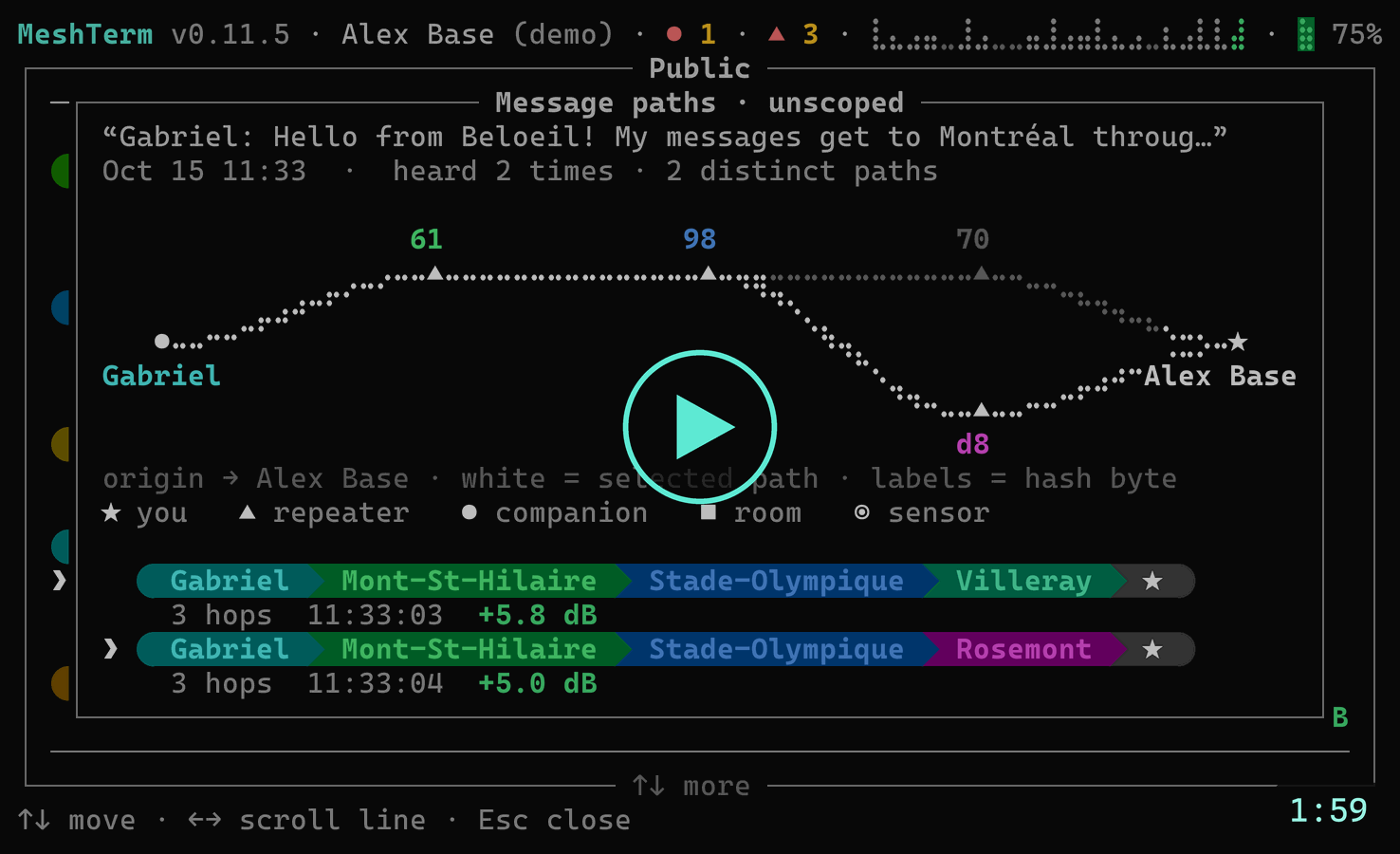
Under two minutes on a real mesh — watch it on meshterm.net.


The dashboard, the map, a trace, the paths a message took — and the whole thing on a PicoCalc.
Why MeshTerm
- One tool, two faces. Launch
meshtermfor a full-screen menu; pass a subcommand for a scripted one-shot. The registry that builds the menu builds the CLI, so they never drift apart. - It remembers. A passive monitor logs every overheard advert and telemetry frame — SNR, RSSI, shared location — to SQLite from the moment the radio opens. Maps, contact lists, charts, and the Time Machine all read back that history.
- It measures. Live trace with per-hop reliability, a coarse→refine→verify TX-power sweep, and a walkable graph of how the mesh actually hangs together.
- It talks. Live channel and direct messaging, store-and-forward courier delivery for
contacts that aren't there yet, and shareable channels as QR codes and
meshcore://links. - It connects however your companion does. Serial (USB), Bluetooth LE, or TCP (a WiFi board or a network proxy) — the discoverable transports are auto-found and picked interactively, a network device is named by hand, and every kind reconnects live when a link drops. No radio? A built-in simulator covers development.
- It works offline. The street map caches OpenStreetMap tiles to disk and falls back to a blank grid when there's no network — it never needs the internet to run.
Install
Download a build
One file, no Python needed — Windows, macOS (Intel and Apple silicon), and Linux (x64 and ARM64, so the uConsole is covered). Every command below fetches the ⬇ latest release, whichever one that is, so none of them goes stale.
MeshTerm is a terminal program, so open a terminal and run it from there. You can double-click it and it will work, but you'll get whatever console your system picks, and if anything goes wrong at startup the window closes before you can read why.
macOS — download it with curl
Don't use your browser. A browser flags the file as downloaded, and macOS then refuses
to open it at all — on Sequoia and later, right-click → Open no longer gets you past that
either. curl flags nothing, so what it hands you simply runs. Open Terminal and paste:
curl -fL -o meshterm https://github.com/jpmartineau/MeshTerm/releases/latest/download/meshterm-macos-arm64
chmod +x meshterm
./meshterm
That's the Apple silicon build — every Mac since 2020. On an Intel Mac, swap arm64
for x64. And if you already downloaded it with a browser, you don't have to start over:
xattr -d com.apple.quarantine meshterm clears the flag.
Linux — the same three lines
linux-x64 on a PC, linux-arm64 on a uConsole or another 64-bit ARM handheld.
curl -fL -o meshterm https://github.com/jpmartineau/MeshTerm/releases/latest/download/meshterm-linux-x64
chmod +x meshterm
./meshterm
Windows
Download
meshterm-windows-x64.exe,
then open Windows Terminal or PowerShell, cd to your downloads, and run it:
.\meshterm-windows-x64.exe
Windows says "Windows protected your PC" the first time. Click More info → Run anyway.
Whichever you took, you now have a file called meshterm — put it somewhere on your
PATH and it's just meshterm from anywhere.
These builds aren't code-signed, which is why macOS and Windows both push back the first time; signing costs real money on both platforms and this is a free side project. Every release ships a
SHA256SUMSfile if you'd rather check what you got, and installing with pip or pipx sidesteps the whole business, since nothing arrives as a downloaded binary.Each release page also carries these commands written out for that exact version, next to its own downloads.
If your terminal draws empty boxes
MeshTerm is drawn with emoji icons, braille charts and powerline path chips, and whether you see them is up to your terminal rather than your font. Windows Terminal, VS Code's terminal, and anything modern on macOS and Linux all draw them correctly.
The classic Windows console — the black cmd.exe window you get from a double-click —
does not. So when MeshTerm lands there it moves to Windows Terminal, says so, and
opens there; nothing is installed and nothing is changed. Where there's no Windows
Terminal to move to, it offers the charts and marks without the icons instead, and will
install Microsoft's Cascadia Mono PL just
for you — no administrator rights, nothing downloaded.
Preferences → Display → Console setup turns all of this off if you'd rather stay put. Terminals, icons, and the Windows console explains why any of it is necessary.
Trying a build without touching your real data. MeshTerm keeps everything in
~/.meshterm— your history database, contacts, channel keys — and every copy of MeshTerm uses that same folder. SetMESHTERM_HOMEto try one in isolation:MESHTERM_HOME=~/meshterm-test ./meshterm # macOS, Linux$env:MESHTERM_HOME = "$HOME\meshterm-test"; .\meshterm-windows-x64.exeSame variable if you run two radios and want them kept apart.
Or install with pip
You need Python 3.10 or newer. That's the only requirement — MeshTerm pulls in everything else itself.
pip install git+https://github.com/jpmartineau/MeshTerm
meshterm
meshterm opens the full-screen menu. That's the whole install.
Rather not touch your system Python? pipx puts the app in its
own private environment and still gives you a plain meshterm command:
pipx install git+https://github.com/jpmartineau/MeshTerm
No radio yet? meshterm --mock runs the entire app against a simulated mesh, so you
can have a look around before you buy anything.
Coming
pip install mesh-term, once the package is published. It isn't yet — the name
question is still being sorted out (why).
Setting up for development instead? That's in CONTRIBUTING.md.
Documentation
The documentation index lists everything, including the two code surveys kept as a historical record. The short version:
| Read | For |
|---|---|
| The command line | Every subcommand and option, what each prints on the plain and JSON faces, the exit statuses, recipes. |
| What MeshTerm does | Every screen the menu offers, and the command that does the same job without it. |
| The CLI cookbook | Common one-liners, by the thing you're trying to do. |
| Configuring MeshTerm | Preferences, device profiles, and everything kept under ~/.meshterm. |
| MeshTerm on hardware | Which handheld manual is yours — the PicoCalc build, or the uConsole bridge. |
| How the code is laid out | The layering, and where a new feature goes. |
| CONTRIBUTING.md | The development setup and the house rules. |
| CHANGELOG.md | What changed, newest first. |
Quick start
# Interactive full-screen menu (auto-discovers serial + Bluetooth companions)
meshterm

# Connect over Bluetooth (address from `meshterm devices`)
meshterm --ble AA:BB:CC:DD:EE:FF info

# Connect over the network to a TCP companion (host[:port], port defaults to 5000)
meshterm --tcp 192.168.1.50 info

# No radio attached? Use the built-in simulator for development.
meshterm --mock

# On a ClockworkPi PicoCalc (Luckfox Lyra / Calculinux) the handheld flavour is
# auto-detected: a 53-column layout, a 16-slot palette, a compact glyph language on a
# custom console font, and an F-key hint lane. Preview it anywhere, or inspect it:
meshterm --mock --platform picocalc
meshterm specimen
Putting MeshTerm on a handheld has its own manuals. MeshTerm on the
PicoCalc takes a stock PicoCalc from the shopping list to a Linux
handheld with a LoRa radio soldered inside; MeshTerm on the uConsole
connects a uConsole's SPI LoRa board through a small bridge. The device-side scripts both
manuals run are in scripts/; not sure which manual is yours?
docs/hardware.md says.
What it does
The menu asks one question — what would you like to do? — and answers it in two halves. Three sections name a doing: Message is chat, channels, the courier outbox and contacts; Watch is the dashboard, the live feed, the watchtower and the time machine; Explore is the map, the mesh walk, tracing and the trophy case. Three name a scope: This node is the radio in your hand, Other nodes is someone else's over the mesh, and This app is MeshTerm itself — preferences, diagnostics, and the written pages.
Nearly every one of them has a mirror meshterm subcommand — the same registry builds
the menu and the CLI, so they can't drift apart. The live pictures stay in the menu,
where their meaning is.
What MeshTerm does is the full catalogue: every screen, what it does, and its scripted equivalent where one exists.
Scripting it
Every command speaks --json, and the global options — --profile/-p, --port,
--ble, --tcp, --mock, --db, --json, --quiet/-q — may be typed before or
after the subcommand.
# Every repeater's public key, for a script
meshterm contacts --json | jq -r '.[] | select(.node.type == "repeater") | .node.key'

# A trace transmits exactly once; run it again to sample more
meshterm trace --target Alice --profile yagi

# Messaging, and store-and-forward for a contact who isn't there yet
meshterm chat send --channel 0 "net in 5"
meshterm courier queue Alice "ping me when you're back" --at 18:30

# The radio's own settings, and a passive capture window
meshterm config set radio_sf 9
meshterm monitor --seconds 60
The command line is the manual — every command and option, what each prints on both faces, and the exit statuses. The CLI cookbook has more one-liners like these.
How this project is run
MeshTerm is one person working evenings and weekends. I'd rather tell you that up front than have you guess from how long things take.
Issues are welcome — all of them. Bugs, questions, "is this supposed to do that". The bug form asks for a fair bit, and that's on purpose: how well a problem is described really does decide whether I can do anything with it. If I can reproduce it, I'll usually chase it. If I can't, I'm mostly guessing.
Ask before you write a pull request. Open an issue first and wait for a yes. I'm not being precious — MeshTerm has firm house rules about how screens get built (they're in CLAUDE.md), and I'd hate for you to spend a weekend on something I then ask you to rewrite. A quick conversation first saves us both.
I can't promise timelines. Some things get fixed the same night. Some sit for a month because life happened. If your issue goes quiet, a nudge is completely fine — it's not rude, it's helpful.
Where to report things. Either works:
- GitHub issues if you have an account. This is where things get tracked and fixed, so it's the shortest path.
- Discord if you don't, or if you're not sure it's a
bug yet. Ask in the support forum, or drop reproducible defects in
#bugs. I move the real ones over to GitHub myself.
Don't worry about picking the wrong one. Getting told about a problem beats filing it tidily.
Also here: CONTRIBUTING.md · SECURITY.md · CODE_OF_CONDUCT.md · CHANGELOG.md
Acknowledgements & attribution
MeshTerm stands on the MeshCore project — its firmware and the
meshcore Python companion library are what make talking to the radio possible.
Map data
The street map is rendered from © OpenStreetMap contributors data, served as vector tiles by OpenFreeMap on the unmodified © OpenMapTiles schema. OpenStreetMap data is available under the Open Database License (ODbL). Tiles are decoded with a small built-in reader for the Mapbox Vector Tile format.
Both map surfaces carry the credit themselves. The full-screen map opens with
© OpenMapTiles · Data from OpenStreetMap in its bottom-right corner and collapses it to
© OpenStreetMap once you pan, zoom or type — set into the panel's bottom border rule on
a desktop terminal, so the drawing itself keeps every cell, and on the map's own last row
on the PicoCalc, whose frame has no bottom rule. The node page's location preview shows the
short form throughout. The About page inside the app spells out the licence URL.
Bundled font
MeshTerm ships Cascadia Mono PL, © 2019–present Microsoft Corporation, redistributed unmodified under the SIL Open Font License 1.1. It's offered to Windows users whose console can't draw the charts — see Terminals, icons, and the Windows console. Microsoft doesn't endorse MeshTerm; the font is simply the right tool, being one of the very few monospace faces that carries the braille block the timelines are drawn from.
Open-source dependencies
MeshTerm is built with these libraries; each is used under its own license (see the respective project for the authoritative terms):
| Library | Role | License |
|---|---|---|
| meshcore | Companion-device protocol (serial / BLE) | MIT |
| pycryptodome | AES/HMAC for decrypting overheard channel packets | BSD-2-Clause / Public Domain |
| pyserial | Serial-port enumeration and I/O | BSD-3-Clause |
| bleak | Bluetooth LE scanning + connection | MIT |
| Typer | Scripted CLI (subcommands mirror the menu) | MIT |
| Rich | Console rendering | MIT |
| prompt_toolkit | Full-screen interactive TUI | BSD-3-Clause |
| markdown-it-py | CommonMark parser behind the written About pages | MIT |
| Segno | Pure-Python QR codes (channel share links) | BSD-3-Clause |
| tomli / tomli-w | TOML config, preferences and device-config backups | MIT |
License
Copyright © 2026 Jean-Pierre Martineau.
MeshTerm is open source under the Apache License, Version 2.0 — free to use, modify, and redistribute, commercially or otherwise. The "MeshTerm" name and any associated logo are trademarks reserved by the author and aren't covered by the code license (see NOTICE); a redistributed fork should go by its own name. The donate link built into the app supports this project and its original author — forks that keep soliciting through it without redirecting it to themselves aren't affiliated with this project.
The bundled font is not covered by that license. meshterm/assets/fonts/CascadiaMonoPL.ttf
is Microsoft's Cascadia Mono PL, redistributed unmodified under the SIL Open Font License
1.1, which travels with it as
CascadiaMono-OFL.txt and stays its only
license.
Each standalone build carries LICENSE, NOTICE and a generated THIRD-PARTY-NOTICES.txt
(every dependency's own license text) inside the archive, and the same three files sit
beside the downloads on the releases page
so you don't have to extract one just to read them.